After months of running an AI agent framework in a real design team, these are the lessons that surprised us the most. Not about which model is best or which tool is fastest - but about how the entire role of design changes when agents can build from specifications.
The short version: strategy became more important than pixels, specifications replaced wireframes as the primary deliverable, and Figma turned from a design tool into an agent training tool.
Everyone’s chasing AI tools right now. Especially in the design community. Every week there’s a new shiny thing. Generate a wireframe. Write some copy. Make an icon. Each one solves one step - brilliantly, in isolation. Then you spend the rest of your day copy-pasting between tools, re-briefing agents, and trying to connect the dots yourself. You become the bottleneck. 🎭
Having Claude draw in Figma is not agentic design - it’s agent theatre. Here’s the uncomfortable truth: most AI design tools make individuals faster, but they don’t make teams better. Nate B. Jones nailed this - designing with AI agents is probably slower and less effective than designing manually, unless you manage to add a certain level of autonomy into the process.
If every agent interaction requires you to hold its hand, you’ve just added complexity without gaining anything. The key is a framework that lets agents work independently within guardrails - where each phase produces documents that the next agent can pick up without re-explaining everything. That’s what Whiteport Design Studio (WDS) does. And here’s what I learned running it.
📚 Lesson 1: Strategy is no longer optional for designers
We used to treat strategy as something that happened before design - a consultant phase, a workshop, a slide deck that nobody opened again. But when we started running WDS in real projects, we realized that AI changes this equation completely. AI didn’t just make development cheaper. It made everything cheaper - prototyping, wireframing, content, even visual design. When producing things is effortless, deciding what to produce becomes the real skill.
That means every designer now carries strategic responsibility. Not just “make it look good” - but “is this the right thing to build?” We learned this the hard way: without strategy, our agents produced beautiful work that solved the wrong problem.
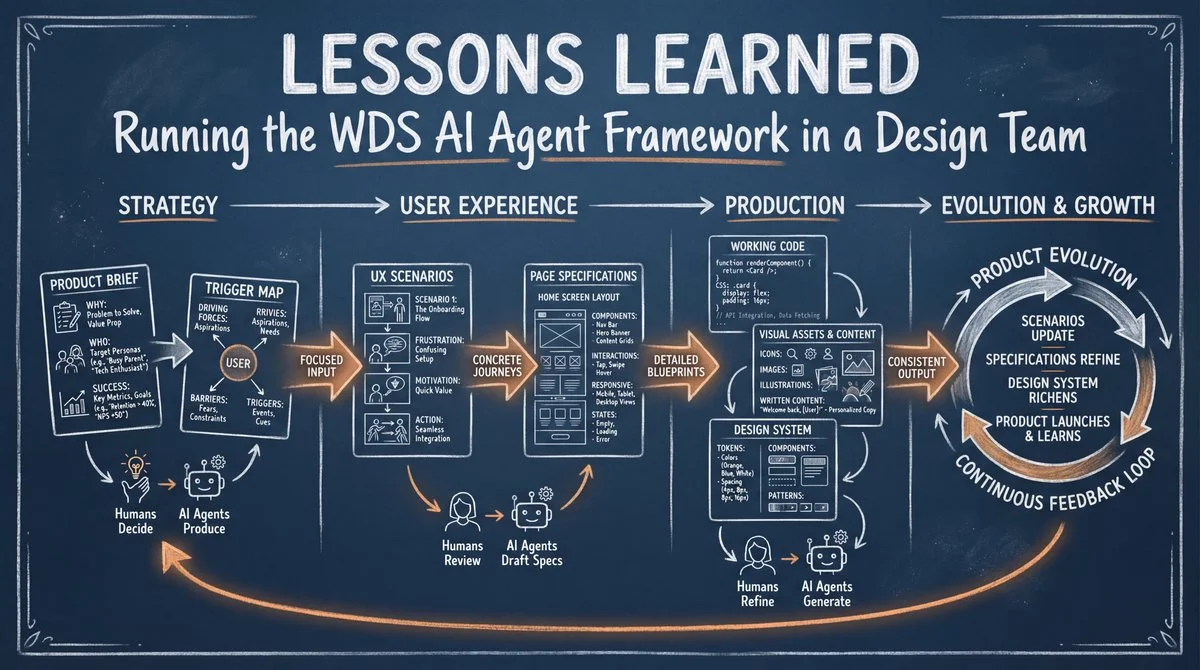
WDS forces this from day one. Phase 1 is the Project Brief - a focused document that answers:
- 🎯 Why does this product exist?
- 👥 Who is it for?
- 📊 What does success look like?
Your team writes this together with an AI agent called Saga, who asks the hard questions most teams skip. This takes an hour, not a week. But it changes everything downstream.
Without a brief, your AI agents are just generating the wrong thing faster.
Instead of strategy being an expensive consultant phase, every designer can now explore strategic thinking with an agent by their side. The Product Brief and Trigger Map become guardrails in the creative process - not limitations, but a platform.
🧠 Lesson 2: Map user psychology before you design
This was our biggest surprise. We expected the design phase to be where WDS added the most value. Instead, it was Phase 2 - the part where we mapped why users behave the way they do. When we ran our first project without a Trigger Map, the scenarios felt generic and the specifications felt arbitrary. When we added the map, suddenly every design decision had a reason behind it.
Phase 2 is where WDS diverges from every other framework: Trigger Mapping. Before a single screen is sketched, Saga maps the psychological landscape for each target group:
- Driving forces - what motivates them to act
- Barriers - what stops them or makes them hesitate
- Triggers - the specific moments that push them over the edge
This document becomes the golden thread through the entire project. Every design decision, every feature, every piece of copy traces back to a real user need - not assumptions, not “the competitor does it this way.”
No other AI design framework maps user psychology before the first pixel is drawn.
✏️ Lesson 3: Figma is not a design tool - it’s an agent training tool
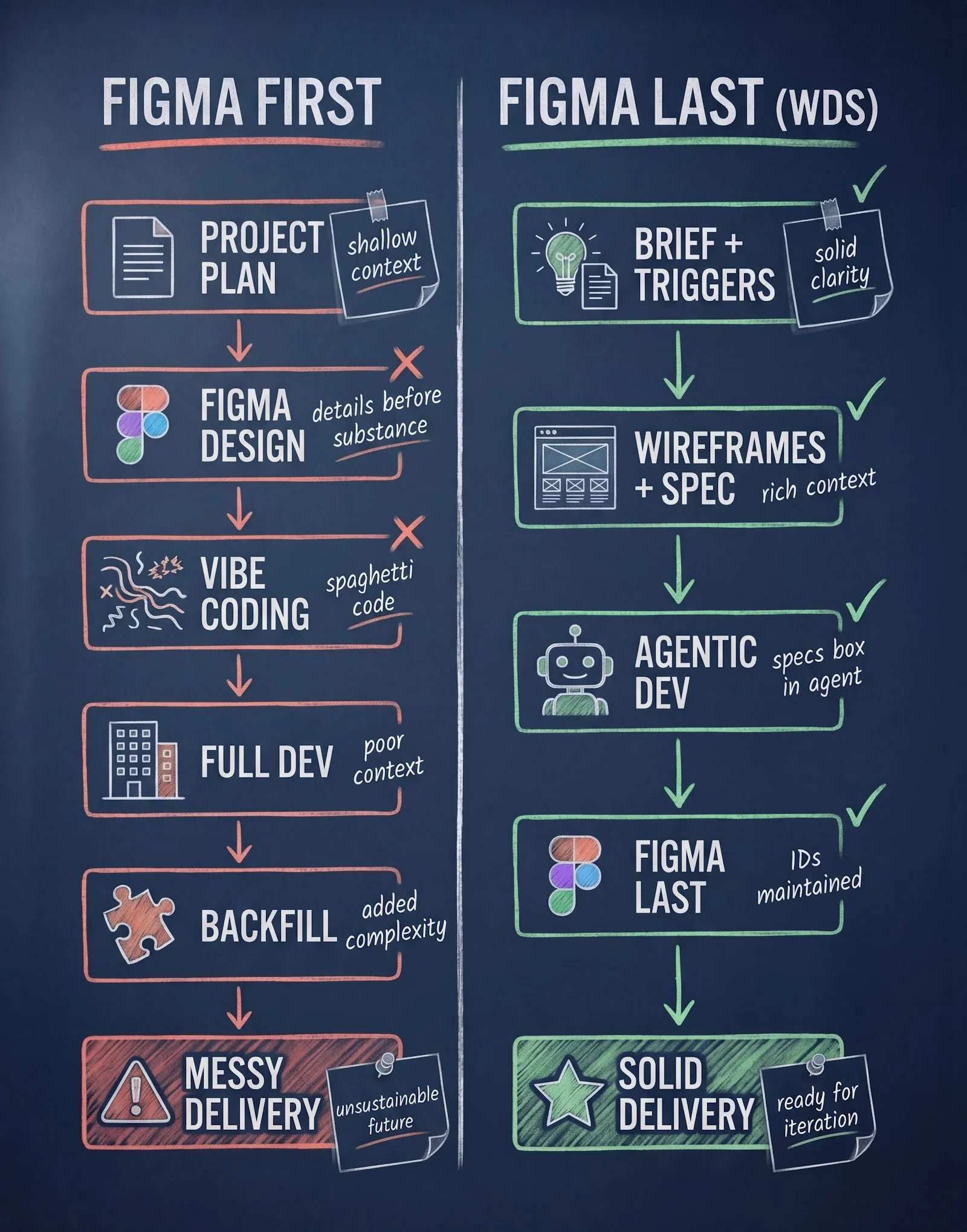
This one was hard to accept. As designers, we had spent years perfecting our Figma workflows. But when we started letting agents build directly from specifications, we noticed something: opening Figma to pixel-perfect every screen was actually slowing us down. The agents were already producing 80% correct output from the specs alone.
Most designers have a fixed mindset: Figma equals design. But Figma becomes a limiting factor when agents develop applications autonomously. The role has changed. Designers are visual instructors - in a system where design and development should be done by agents, so humans don’t become bottlenecks.
In WDS, Phase 3 is UX Scenarios - concrete user journeys grounded in the Trigger Map. An AI agent called Freya creates scenario outlines that expose every page your product needs.
“Maria is frustrated because she can’t find the right size - the search needs to solve that in under 10 seconds.”
Then in Phase 4, the agents wireframe and specify every screen. They write code using the design system. Only when you don’t like what you see, you open Figma - to develop the design system, not to micromanage screens.
Each round trip makes the system smarter. Eventually, the agents handle 90% of screens without you opening Figma at all. 🔄
📐 Lesson 4: Specifications are the new code
We discovered this when we watched two different AI models build the same page from the same specification - and both produced working, testable code within seconds. The specification wasn’t a document that needed to be “translated” into code. It WAS the instruction set. The code was just a rendering of it.
Sean Grove from OpenAI said it best: “Spec is the new code.” If you haven’t seen his talk, watch it - it changed how I think about the designer’s role entirely.
Phase 4 is UX Design - where scenarios become detailed page specifications. Layout, components, interactions, responsive behavior, accessibility. Freya works through each screen in three modes:
- 💬 Dialog - discuss what the page needs
- 💡 Suggest - the agent proposes, you confirm
- ✨ Dream - the agent creates autonomously, you review
The output isn’t wireframes or mockups. It’s specifications - detailed enough that any developer, human or AI, can build exactly what was designed. The specs live in code and open in any design application.
When specs are the deliverable, designers don’t hand off - they define. The spec is the product. The code is just a rendering of it.
🚫 Lesson 5: Vibe coding is a dead end
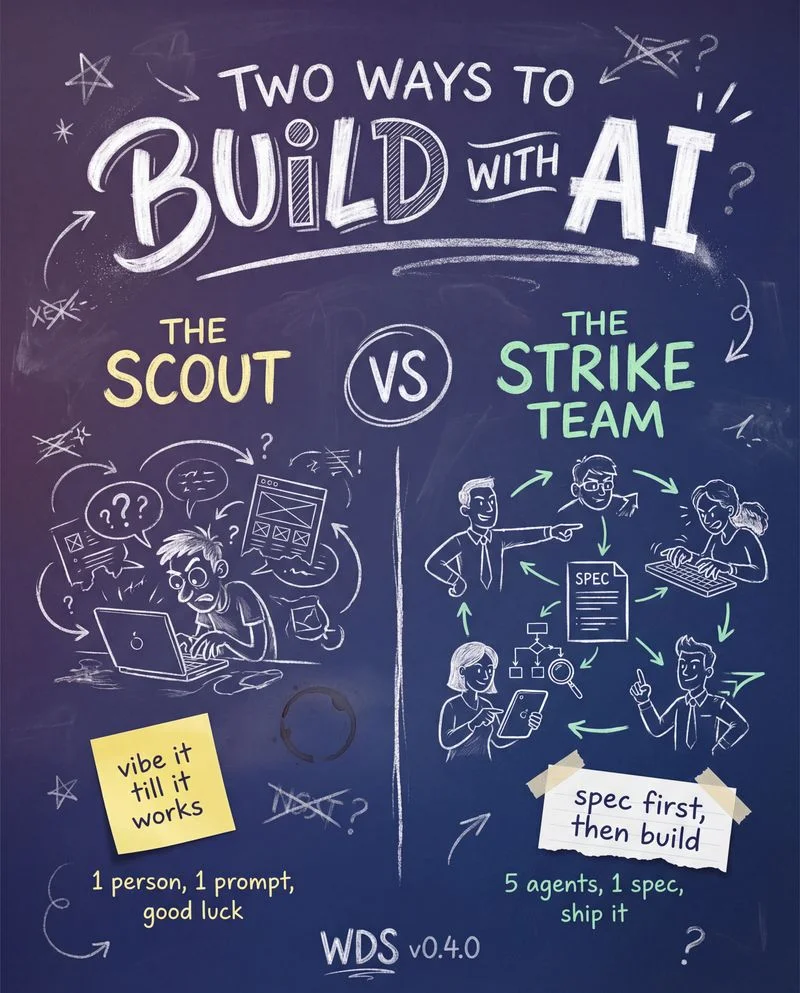
We’ve all been there. You fire up an AI tool, describe what you want, and within minutes you have something that looks like a product. It feels like magic. But after running dozens of projects through WDS, we learned that these quick prototypes almost always died in production. Nobody could explain why a feature existed. Nobody could trace a design decision back to a user need. The prototype impressed in a meeting, then fell apart under scrutiny.
Let’s be honest. Vibe coding is fun. But in a professional setting, it’s hot air unless you can follow the chain of strategic logic from business goal to user value. 💀
Phase 6 is Asset Generation - but not the “generate random image” kind. Every asset - images, icons, videos, written content - is created from a specification:
- 🖼️ The AI knows what the image needs to communicate because it knows the trigger map
- 📝 Copy is written from the scenario context, not from a blank prompt
- 🎨 Visual style follows the design system, not the mood of the day
Strategy, not vibes. Traceability, not magic. Every asset has a traceable origin in your project brief.
🏗️ Lesson 6: A design system is architecture, not a luxury
Early on, we tried running WDS without a design system. The agents produced wildly inconsistent screens - different spacing, different button styles, different color choices every time. We learned that a design system isn’t a nice-to-have polish layer you add at the end. It’s the basic architecture that makes agent-driven development possible at all.
Too many teams treat the design system as something you build “when there’s time.” But without it, your agents reinvent the wheel on every screen. In WDS, Phase 7 is the Design System - but you don’t build it upfront and hope it fits. You develop it over time, step by step, as you explore through scenarios. A WDS design system includes:
- 🎨 Design tokens - colors, typography, spacing - the brand DNA
- 🧩 Component specs - buttons, cards, inputs - reusable building blocks
- 📐 Patterns - navigation, forms, layouts - proven solutions
The feedback loop makes it grow:
- Agent builds a screen from the spec
- You review - something’s off
- You adjust in Figma - fix the spacing, tweak the color
- That adjustment gets captured as a design token or component update
- Next time, the agent gets it right 🌱
The design system grows organically from real work - not from a theoretical workshop.
⚡ Lesson 7: From wireframe to working code in seconds
The first time we saw this happen, it changed everything. An agent read a page specification, generated a working component, and we had it running in the browser in under a minute. Not a mockup. Not a screenshot. A real, interactive, testable page. That moment made us realize that the old workflow - design in Figma, export assets, brief developers, wait for implementation - was simply over.
Starting with a specification has one massive advantage: the unified ID. When you begin with a wireframe and a specification, you can get working code back in seconds - real code, testable on the actual device.
Design stored as pixels doesn’t bring value - it becomes a liability. Wireframes and specifications can come alive instantly.
The code preserves layer IDs, so when you open it in a design application, every object can be matched and refined. The specification is the source of truth. Figma is where you give it the final polish.
Multiple agents can now collaborate on the same codebase - give each other feedback, test each other’s work, review across models. We’ve seen two AI models find completely different bugs in the same code - 5 from one, 4 from another.
From wireframe to working code. No handoff. No waiting. No lost-in-translation.
🔄 Lesson 8: You don’t have to start from scratch
One of our most important discoveries was that WDS works better on existing projects than on new ones. We expected greenfield to be the sweet spot. Instead, brownfield projects gave us richer trigger maps, more realistic scenarios, and faster agent output - because there was more context to draw from. The agents had real code, real design, and real user behavior to learn from.
You don’t need a greenfield project to use WDS. In fact, brownfield is easier - you have more to draw on than a blank sheet of paper. More legacy code, more existing design, more context for the agents.
Phase 8 is Product Evolution - the full WDS pipeline in miniature. The same process, scaled down to a single improvement:
- 🔍 Outline your changes in scenarios
- ✏️ Draw and specify
- 🤖 Implement with agents
- 🎨 Adjust in your design application if needed
- ✅ Ship
Whether you’re building something new or improving something old, the principle is the same. The trigger map evolves. New scenarios emerge. The design system grows. Each round makes everything smarter.
What this means for your team
WDS isn’t another tool to chase. It’s not another hype. It is a stable process that won’t go out of style just because the models get better - quite the opposite. Here’s what you get:
- ✅ 5 phases, multiple deliverables per phase - Strategy, UX & Design, Development, Testing, Product Evolution
- ✅ Trigger Mapping - user psychology as a design foundation (unique to WDS)
- ✅ Specifications as deliverables - agents can build from them, humans can read them
- ✅ Design system that grows - from real work, not theoretical workshops
- ✅ Cross-model review - multiple AI agents catching each other’s mistakes
- ✅ Open architecture - add your own skills, tools, and workflows
The framework is supported by a growing community to make sure it stays optimized for new models. And it’s completely free.
The documents your team produces - briefs, trigger maps, scenarios, specifications, design systems - become the shared language between strategy, design, and development.
No more throwing wireframes over the wall. No more “but why did we build it this way?” Everything is traceable, connected, and lives in your repository - version-controlled, branchable, yours.
🆓 Free · Open source · MIT licensed · Works with any AI model · No vendor lock-in
👉 Get started with WDS on GitHub
Need help implementing this in your team?
Mårten Angner · Founder, Whiteport
I help design and development teams get started with AI — and work smarter once they're up and running. Whether you need hands-on workshops, process design, or someone to guide your first agentic project from strategy to production, I've done it and I can help you do it too.
Connect with me and I'll send you a free handbook for founders and design team leads — a practical guide to rolling out WDS in your organization. 📬