The sooner we designers learn how to work with our design in code the better!
Most designers are visual people and wish to see the app laid out before them in the design application before they start any development. This is the process we know and are comfortable with — as a designer we get visual control and this is the way UX and design has always worked.
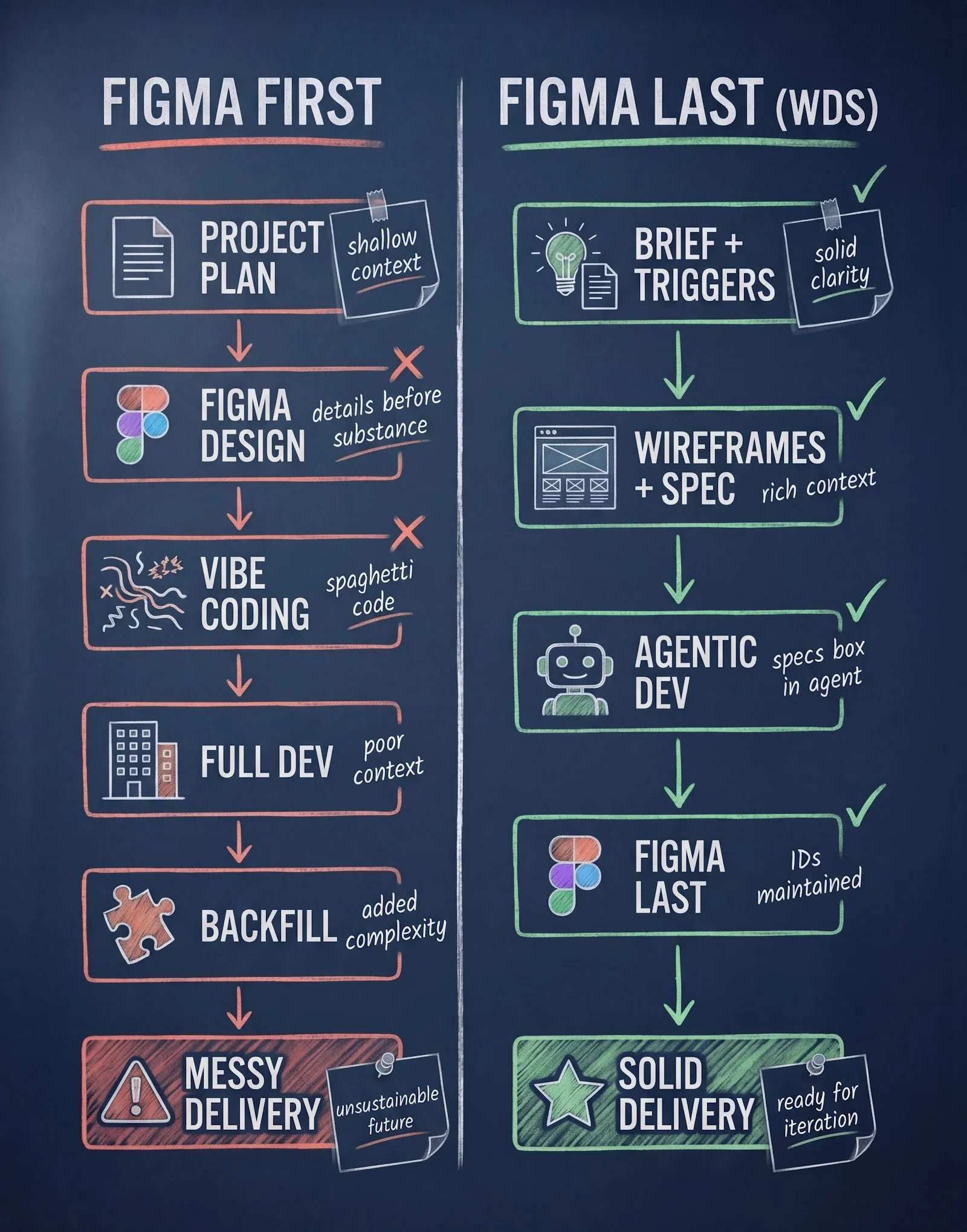
In a world of AI, this emphasis on the designer’s comfort in the visual presentation creates context starvation for the agents, that need far more details than what is found in a Figma file.
“What is comfortable for us designers is really bad for the AI Agents.”
Recent popular attempts to use Agents to draw for us in Figma is not a solution to the problem and comes with a heavy token count. The problem is not that the agents are not helpful, the problem is that the order we do things actually matters.
Agents work in code, so we designers need to learn how to work with our agents — not against them. If we wish to unleash the power of AI we designers need to step aside and stop having pixel control and instead give optimal conditions for AI to design the systems for us, and get better at it in the process.
Real talk: Figma designs provide great details but poor context
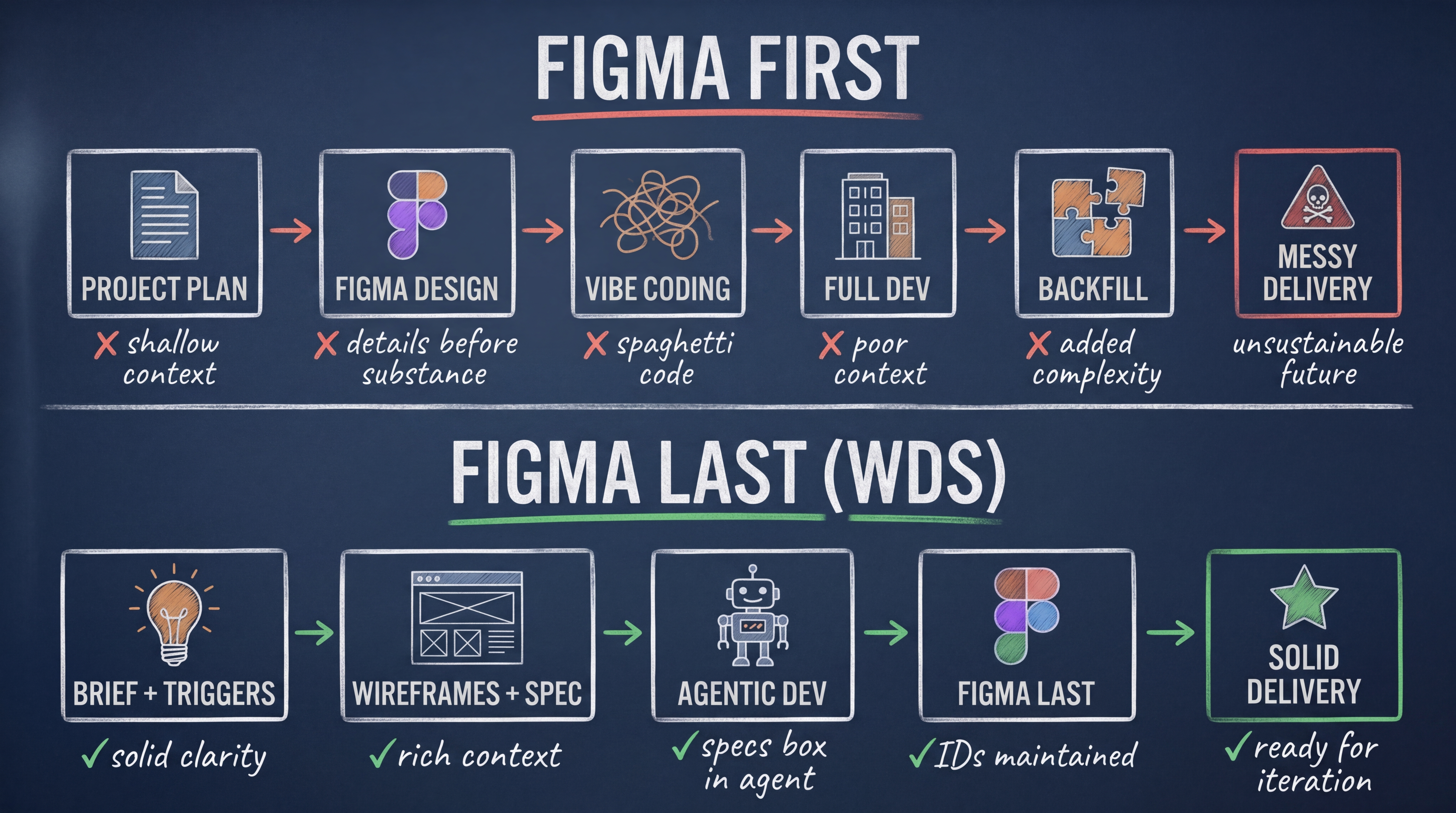
Where the designer spends valuable time fine-tuning visual direction that has terrible context for the agents. This practice also kicks important decisions and context — like responsive behaviour, error states and content — down the road. We end up with a bunch of pretty pictures that give the agents very little guidance, and before you even have any idea about whether your idea even works.
“Having Claude draw for you in Figma is like running faster with the wrong map. It only gets you lost even quicker.”
What follows is a vibe coding nightmare where the pretty surface gets converted into code. The more you work the further away you are from the initial planning. Each change creates more confusion and the AI needs to keep guessing. Each prompt makes your project worse, not better.
Clarity: the most important factors in agentic design
Are you trying to make AI help you design faster in Figma? You are doing it wrong. You are supposed to design the context and gradually give the agents more of what they need to build the software for you — and pretty pictures is not it.
We need to box in the agent with instructions that literally make errors impossible.
The Whiteport Design Studio (WDS) urges designers to flip the script and work with the agents instead of against them. Use the agents to think and get clarity about the product and the users before clicking the button and letting AI design the app for you.
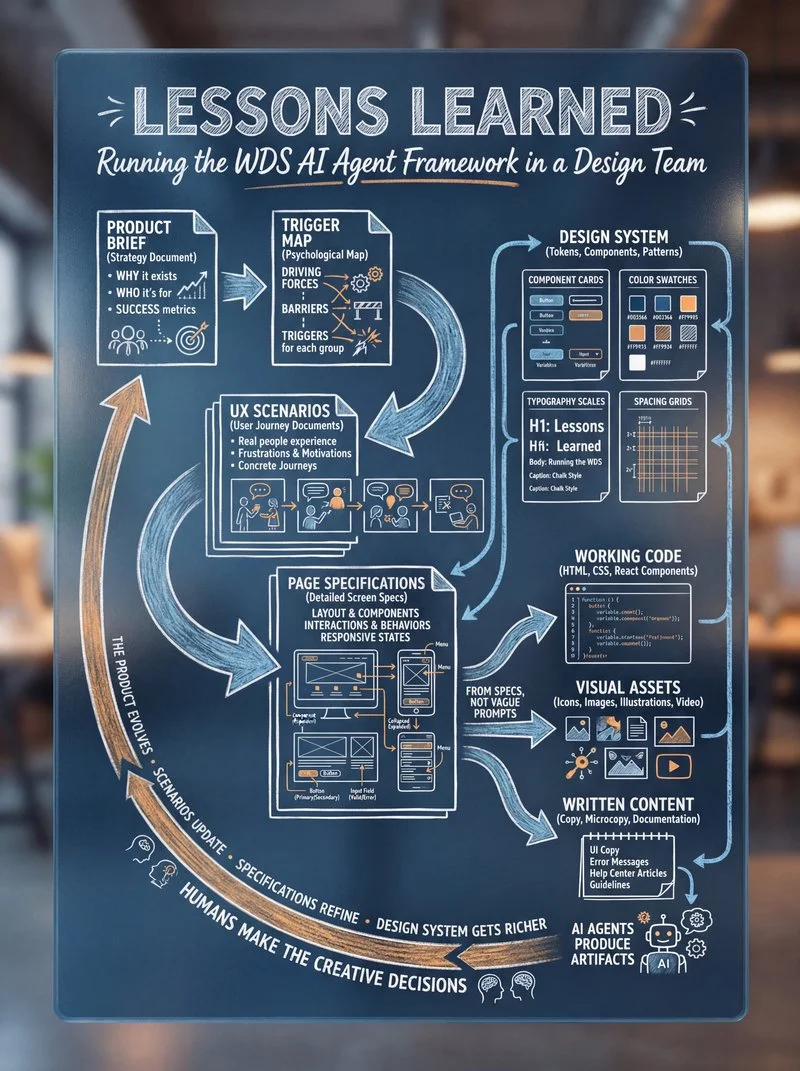
WDS is a complete system for designers who want to update their skills and capabilities for the age of AI. It encompasses strategy, scenario design, and agentic development — and comes with a full curriculum and all the tutorials you need to work with agents across your entire design process.
Direction: Nail down your strategic documents
Instead of jumping into Figma as fast as you can, the WDS method guides you through a structured process that starts with strategic clarity. Outline your goals and vision, clarify what your app is going to be about, how it is intended to be used — and go into depth to describe the product, its users and what driving forces in your imagination will compel the users to engage in the app and why they will love your product. WDS gives you the frameworks and prompts to get there, step by step.
“No ban on Figma — but a call to use Figma when you know where you are going!”
The good news is that you will have all the support you need from AI that will ask you enough questions to find a common understanding. In the WDS, instead of a shallow project plan you will have a dense and detailed full brief, platform requirements and all the supporting documentation you need.
And the kicker: the process will make you a better and more insightful designer. Instead of stressing and throwing pixels at the wall hoping it sticks.
Lo-fi: Design by following the user journey
The next step in the WDS process is to wireframe your solution in Scenarios. Each scenario has steps that are visualised by a wireframe and a detailed specification where you describe the purpose of every object on the screen to the best of your ability.
This is your second opportunity to deepen your understanding of the product you are building. You connect each object to your design system and add content and translations, error texts, and explain functionality, animations and anything the agents need to know to design the system.
“By all means, let the AI dream up things and surprise you — but make wireframes and specifications to define your chosen direction!”
Again, the agents will be super helpful in suggesting solutions, layout and writing copy based on the knowledge you outlined in the strategic documentation. When your scenario is outlined and you can confirm that your solution fits together logically, you are ready to let the agents build the product for you.
Making the documents also makes sense from a token sustainability standpoint. The documentation you can in many cases produce using simpler tier or open source models at a fraction of the price compared with the most flagship versions.
Make it real: Autonomous agentic implementation
With the strategy in place, the UX scenarios outlined and the specifications ready, you have now created the optimal conditions for agentic brilliance.
The documents as context, your agents can fill the design with the content you outlined and you can literally press the button and your design will come to life. The result that comes out is the direct consequence of your level of detail and the state of your current design system.
Now, you have your app — and if you don’t like anything, you just edit the wireframe and the specifications and the agents will re-generate the code instead of creating a mess.
With real code you can now validate functionality, content and the user experience without spending hours upon hours pushing pixels.
Figma for agent training
Now the time has come to open your code in Figma. As it does, it creates perfectly flexible designs and keeps all the content in seconds, and every layer in the document has maintained IDs — and the agents can see each adjustment and refinement you make.
Instead of flat and lifeless designs, messy code and a complete lack of awareness, your project now has an unbroken chain of logic and context for all views ready for future iterations.
“Open the code in Figma and save hours on drawing each object by hand or by agents!”
The difference from the WDS method and the Figma-first approach is even more visible in larger organisations and teams that work on a product over time.
Here the design debt and context starvation become more and more visible and acute as time goes by. Doing Figma last instead of first is the subtle shift that enables Agentic Design and development.
With the object IDs maintained while designing, you improve the usability of the Figma MCP that can now easily spot your changes and adjust the code after your visual direction.
Adapt or get pushed aside
The world does not need designers clinging with teeth and nails to a comfortable but hopelessly ineffective way of using AI. The world needs agent trainers with the full depth and confidence that we designers have for the product and the users.
“I cannot imagine a world where designers are not the people driving the future.”
We designers need to make the shift — sooner rather than later — and become prominent at not only being able to envision the future and draw visually appealing pictures. We also need to be strategists with the ability to forge the strategic documentation that will become the future.
Try it out, adapt the model
Whiteport Design Studio is free and open source. For designers, WDS is a complete system for updating your skills and capabilities for the age of AI — covering strategy, scenario design, and agentic development from end to end. It includes a full curriculum and practical tutorials so you can apply the method across your entire design process, whatever your current level.
We are open to contributions from our users as with all other parts of the vibrant BMad community. Feel free to reach out if you have any questions — and if the decision to apply the methods and frameworks in your team does not lie with you, feel free to share my contact with your team lead.
“I do team training that matters in agentic design.”
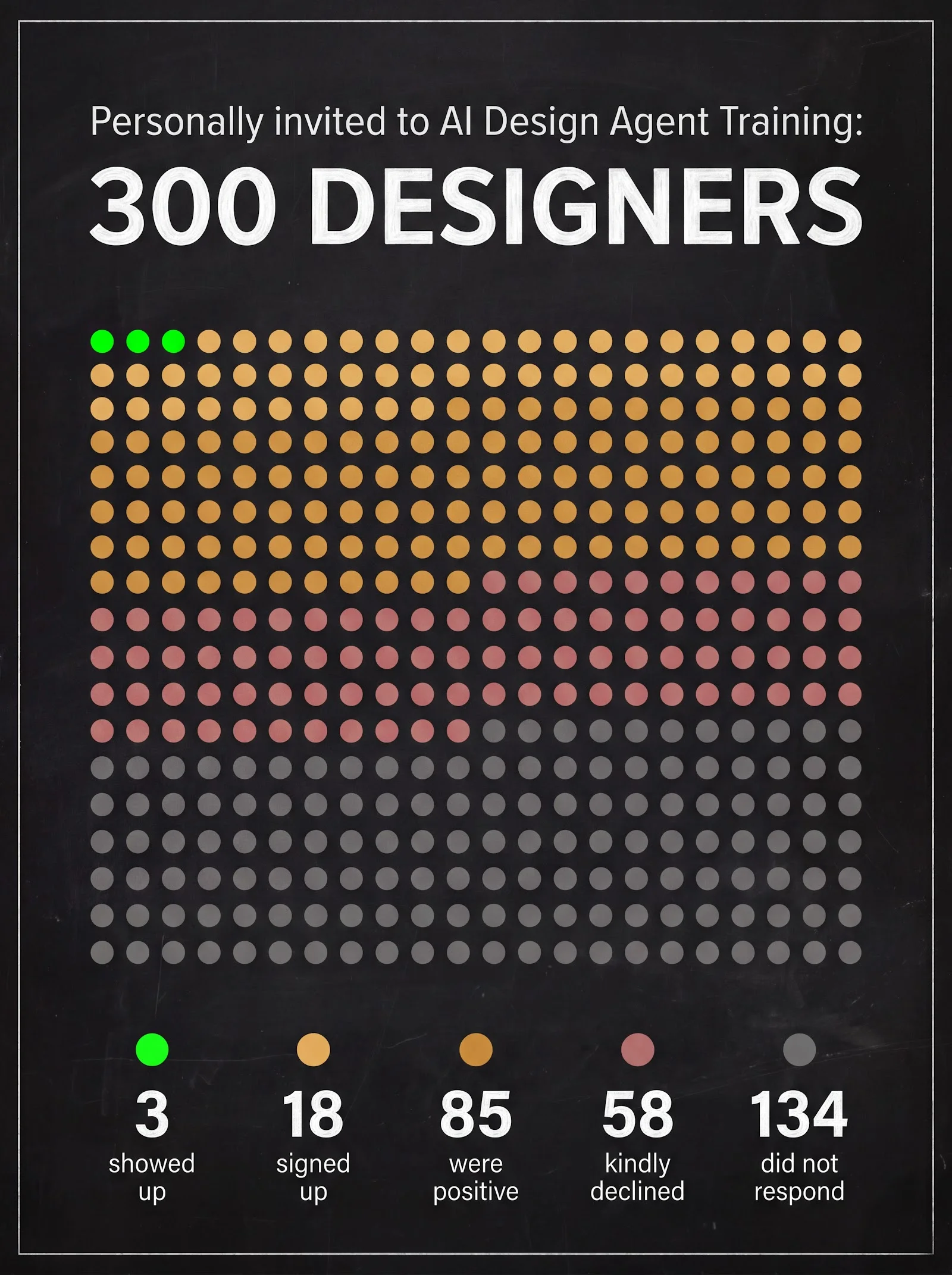
In recent months I have been invited to support multiple design teams in their agentic journey. Maybe your team is next.